How to Make GIFs with ChatGPT Images 2.6
 GifBunny Team
A field-tested guide to making GIFs with ChatGPT Images 2.6: motion prompt templates, six real examples, and how to fix the failures we hit.
Here's a GIF we made with ChatGPT Images 2.6 from one prompt and one still image:

Made with ChatGPT Images 2.6. 12 frames, 100 ms each, a 1.2-second loop.
A titanium lotus opens its petals, shows off a glowing cyan core, throws out a ring of light, and closes again. On loop, forever. No timeline, no keyframes. The model did the whole thing.
That model was ChatGPT Images 2.6, the image model inside ChatGPT. In the API docs it goes by GPT-Image-2.6, and it can return an animated GIF directly. You either describe a motion in words and get a loop, or you hand the model a still image and tell it to animate that exact thing.
We build GifBunny on top of this model, and we wanted to know how far it can be pushed. So we ran 56 generation jobs through APIMart's ChatGPT Images 2.6 endpoint in a single day: 50 GIFs and 6 fresh reference images, across characters, animals, products, paper art, ink painting, and mechanical effects. Every prompt, parameter, and bill got logged. Every finished file got re-measured frame by frame afterward. This guide is what fell out of that day.
GifBunny itself hides the complicated parts behind two choices, so you never have to touch an API. If you'd rather learn by doing, open the generator and keep this page open in a second tab. The prompt craft below works anywhere you run the model, including here.
How to make a GIF, step by step
Describe the motion, not the subject. "A red panda" gets you a picture. "A red panda squats, springs into a heroic jump, lands squashed flat like a pancake, then pops back upright" gets you a GIF. Write the action as a short sequence of beats, in order.
Optionally, start from a reference image. If you need a specific character, product, or art style, generate or upload one still image first, then animate that image. This mirrors how the API works: text-to-GIF goes through the generations endpoint, and reference-guided animation goes through the edits endpoint.
Pick the two settings that matter. In GifBunny that's:
| Setting | Options | Default |
|---|---|---|
| Motion detail | Simple (8 frames) · Standard (12 frames) · Rich (16 frames) | Standard |
| Playback speed | Fast (80 ms/frame) · Natural (100 ms/frame) · Slow (150 ms/frame) | Natural |
Frame count sets how much motion fits in one loop. Frame duration sets how long each frame stays on screen. Everything else, meaning size, quality, and complexity, GifBunny handles with tested defaults. The parameter section below explains why offering you those dials wouldn't actually help.
Check the loop before you download. Watch one full cycle and ask four questions. Does the subject return to its starting pose? Does every action peak actually happen? Is the whole subject inside the frame at its biggest moment? Does the material stay consistent? If any answer is no, fix the prompt or the reference composition first. Not the settings. The parameter section will show you why we're so insistent on this.
How to write the prompt
Every prompt that worked for us had the same seven pieces. OpenAI's own prompting guide recommends the same fundamentals: define the result, describe visible details, and separate what changes from what must stay the same.
- Subject and style. One clear subject, a named medium: clay stop-motion, cel animation, folded paper, Chinese ink.
- Starting pose. Where the loop begins. Also where it has to end.
- Anticipation. A small beat before the big one: a crouch, a squat, an inhale. It's what makes motion read as intentional instead of twitchy.
- The peak. The most dramatic moment. Spend your best words here.
- Recovery. The return to the starting pose, stated explicitly. This is the beat the model skips most often.
- Camera. Say it's fixed. Two words that prevent zooms and drifts.
- What stays and what moves. Preserve identity, materials, and proportions. Allow only the intended motion and its effects.
Here's a general template to adapt. This one is a template, not one of our experiment prompts:
[Subject and style: one subject, named medium, named background].

One complete motion cycle: [starting pose] → [anticipation beat] →
[the peak, described boldly] → [recovery back to the exact starting pose].

The movement must be large and clearly readable, not just a face or
texture change. Fixed camera; the background and floor stay still.

Preserve [identity: colors, materials, proportions] while allowing
[intended deformation or effects]. Keep the whole subject inside the
frame at its biggest moment. Return to the starting pose and lighting
before the end, seamless looping GIF. No text, logos, or panels.
Round-trip motions vs. continuous rotation
There are really only two loop designs, and they want opposite endings.
A round-trip motion, like open/close, jump/land, or shatter/reassemble, returns the subject to its starting pose, and the effects fade before the last frame. That's what the template does. It's also what OpenAI's own GIF example does: a monkey lifts a lantern, blinks, and lowers it back to where it started.
A continuous rotation, like a turntable or an orbit, must never return to the starting pose. The last frame should sit one step before the first, so playback glides into the next lap. Asking these motions to "return to the starting pose" creates a visible hitch at the seam. Ask instead for constant motion through the last-to-first transition, equal angular steps, no stops, no reversals. Rotation is also where the model is least precise, so treat it as advanced mode. We'll come back to this in the failures section, with scars.
Six real examples from ChatGPT Images 2.6
Each prompt below is the exact English prompt we submitted for that GIF. All six ran at 512×512, 12 frames × 100 ms, on ChatGPT Images 2.6, and all six passed our review bar with those same settings.
1. Mechanical Lotus — image-to-GIF

The reference still, generated first. Closed bud, subject small in frame, empty space reserved above.
Look at how the reference brief composes the bud into the central half of the frame. That empty space is the whole reason the open petals never crop. The animation prompt then just runs the beats:
An original compact mechanical lotus bud made of brushed titanium petals
with thin cyan light seams, fully closed on a small dark circular
pedestal. Premium precision-machined sci-fi product render, midnight blue
studio, dramatic rim light. Entire object occupies the central half of a
square composition, ample empty room above and around for petals to
unfold. One bud, clean silhouette, no text or logos.
Animate the titanium mechanical lotus from the reference image as a
dramatic complete open-and-close cycle: begin fully closed, open the
metal petals widely to reveal a brilliant cyan energy core, release one
expanding circular light pulse, then retract the petals and close
completely before the cycle ends. Petal movement must be large and
clearly visible. Preserve titanium materials, cyan seams and pedestal
identity. Fixed camera and stable dark studio; the pulse may animate.
Keep the full opening inside the frame. Return to the same closed
starting pose and lighting, seamless looping GIF. No text, logo, grid or
panel layout.
One honest note on the loop above: its first two and last two frames barely move, so there's a soft pause at the closed pose. We decided we could live with it. You'll see this pause again in the frame-count section, because it turns out more frames make it worse, not better.
2. Street Dance Spin — image-to-GIF
A crouch to load up, a full-body spin with the jacket flaring, a landing back into the ready pose. One sentence in this prompt earns its keep more than anything else on this page: "The body movement must be large, not just face motion." Left to its own devices, the model loves animating faces and glows while the body just stands there.
Animate the adult dancer in the reference through one bold dance move: a
short anticipation crouch, one energetic full-body spin with the yellow
jacket flaring widely and a cyan motion ribbon following the turn, then a
clear two-foot landing into the original ready pose. The body movement
must be large, not just face motion. Keep her recognizable face, violet
bob, yellow jacket and turquoise sneakers. Fixed camera, stable floor and
background; only the dancer and motion ribbon move. Keep every limb
inside the frame, consistent anatomy, no extra limbs. The ribbon
disappears and the starting pose returns before the end, seamless
looping GIF. No words, logos or panels.
The reference put her in the central 55% of the frame with clear space around her hands, feet, and head. That headroom is what kept every limb inside the frame mid-spin. Fair warning from our frame-by-frame check: her face goes soft during the fastest part of the turn. That's the trade you make for a full-body spin at this frame count.
3. Red Panda Hero Fails — image-to-GIF
Comedy needs readable squash-and-stretch. Squat, heroic jump, pancake-flat landing with an orange impact ring, elastic pop back to paws-on-hips:
Animate the clay red panda hero in the reference in one funny
jump-and-recovery gag: squat in anticipation, spring into a big heroic
jump, land comically squashed like a soft pancake with one orange impact
ring, then elastically pop upright into the original paws-on-hips pose.
Exaggerated squash and stretch, unmistakable body motion and comic
timing. Preserve rust-orange fur colors, cream cheeks, striped tail and
teal headband while allowing intentional clay deformation. Camera and
peach studio stay fixed. Keep the whole jump in frame. Impact ring fades
before the end, return to the starting pose, seamless looping GIF. No
text or logos.
Notice the phrase "while allowing intentional clay deformation". For stylized materials, giving the model explicit permission to deform in the medium's own style buys you far livelier motion than a blanket "keep everything identical" ever will.
4. Citrus Energy Splash — image-to-GIF
This is the pattern for animating products: keep the product rigid and stationary, and give all the motion to something that can appear and disappear. Liquid, light, sparks. Effects that fade before the last frame make clean loops almost automatic.
Animate an explosive-looking but clean beverage-ad loop using the magenta
soda can from the reference. One glossy orange citrus-liquid ribbon
bursts upward beside the can, spirals once around it in a large arc,
forms a bold crown splash, then curls back toward its source and
disappears before the end. The can remains upright, rigid and stationary;
preserve its magenta color, silver top, citrus-circle graphic and
condensation. Fixed camera and stable purple studio. Show large readable
liquid motion and a few following droplets, keep all effects in frame.
Begin and end with the same clean product shot, seamless looping GIF, no
extra text, logos or objects.
5. Paper Ocean Breach — text-to-GIF
No reference image here. The scene and the motion live in one prompt, which means the style has to be nailed down twice: once for the subject ("made entirely from folded and cut paper") and once as a constraint ("stable paper material"). Otherwise the material tends to drift mid-loop.
An original deep-blue whale and layered turquoise ocean made entirely
from folded and cut paper, ivory background with subtle paper shadows. A
large breach-and-return cycle: the whale launches high from the paper
sea, arches its whole body with tail and flippers visible, then dives
back through a bold fan of paper-cut white spray. The sea settles and
the whale returns to the same partly submerged starting silhouette
before the loop repeats. Strong vertical action, clear paper folds and
layered edges. Fixed wide side camera, all splashes remain within the
square frame, stable background and paper material. Seamless looping
GIF, no lettering or logos.
6. Tiger Through the Ink Ring — text-to-GIF
"Generous margins" and "always visible" quietly did most of the work in this one. Even so, at the leap's peak the right forepaw grazes the frame edge. That's exactly the kind of thing your step-four check exists to catch.
A powerful original orange tiger painted in expressive Chinese ink and
saturated vermilion watercolor, on warm ivory rice paper. One dramatic
leap cycle: crouch low, leap through a black ink ring with forelegs
stretching far forward, land with a sweeping splash of ink beneath the
paws, then gather back into the original crouch as the ink ring reforms.
Strong readable silhouette, muscular full-body action, brushstroke energy
rather than tiny facial motion. Fixed side three-quarter camera, full
tiger and tail always visible with generous margins. Preserve stripe
identity, four legs and coherent anatomy. Background paper stays still
while the ink effects move. Seamless repeating GIF, no calligraphy, text
or logos.
Six materials, same recipe, same settings.
What the parameters actually do
The API behind ChatGPT Images 2.6 exposes more knobs than GifBunny shows you. Per the official GIF documentation, frame_count runs 2 to 16 and frame_duration_ms runs 20 to 2000 in 10 ms steps. quality controls how much rendered detail you get. complexity controls how much planning the model does before it starts rendering. We ran matched tests on each, same lotus reference, same prompt, one parameter at a time.
Frame count: more frames ≠ more motion
| Frames | Loop | What we got |
|---|---|---|
| 4 | 0.4 s | Opens but never closes. It just jumps back to the start. Too few beats for a full cycle. |
| 8 | 0.8 s | Complete open, ring, close. Returns to start. |
| 9 | 0.9 s | Complete, no visible benefit over 8. And billed more than 12, for reasons we can't explain. |
| 12 | 1.2 s | Full arc with the ring. Our baseline. |
| 16 | 1.6 s | Complete, but the last five frames sit nearly closed. A static tail, not more motion. |



A frame count that's too low doesn't shorten the motion. It deletes beats. Four frames dropped the recovery entirely, leaving a jump cut where the closing should be. And billing doesn't scale per frame at all: in our run, 4 and 8 frames cost the same, and 9 cost more than 12. So never reason about cost as "price per frame". Think in tiers.
Playback speed: a rhythm choice
At 12 frames, durations of 60, 100, 150, and 200 ms gave us loops of 0.72, 1.2, 1.8, and 2.4 seconds. The bill was identical in all four cases. These are natively generated animations, not re-timed ones, so content varies slightly between them. 60 ms felt tight and energetic. 100 ms read the most balanced. 150 and 200 ms started to show a stepped, flipbook feel.
One thing duration can't do is rescue missing beats. In a matched 0.96-second cycle test, four slow frames still failed to close the lotus, while 8 × 120 ms completed the loop comfortably. Slow motion is not a substitute for enough frames.
Quality: expensive, and it fixes the wrong things
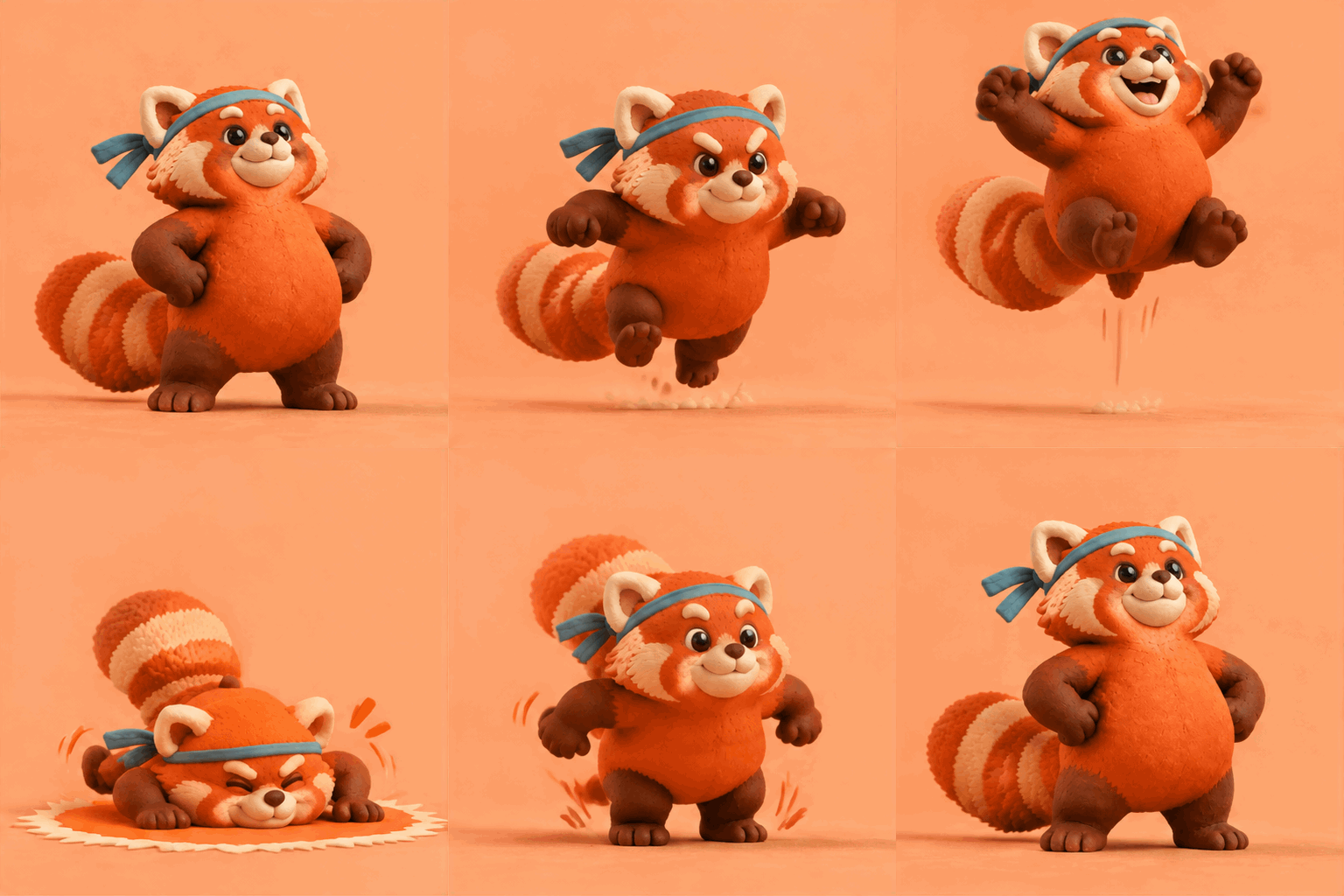
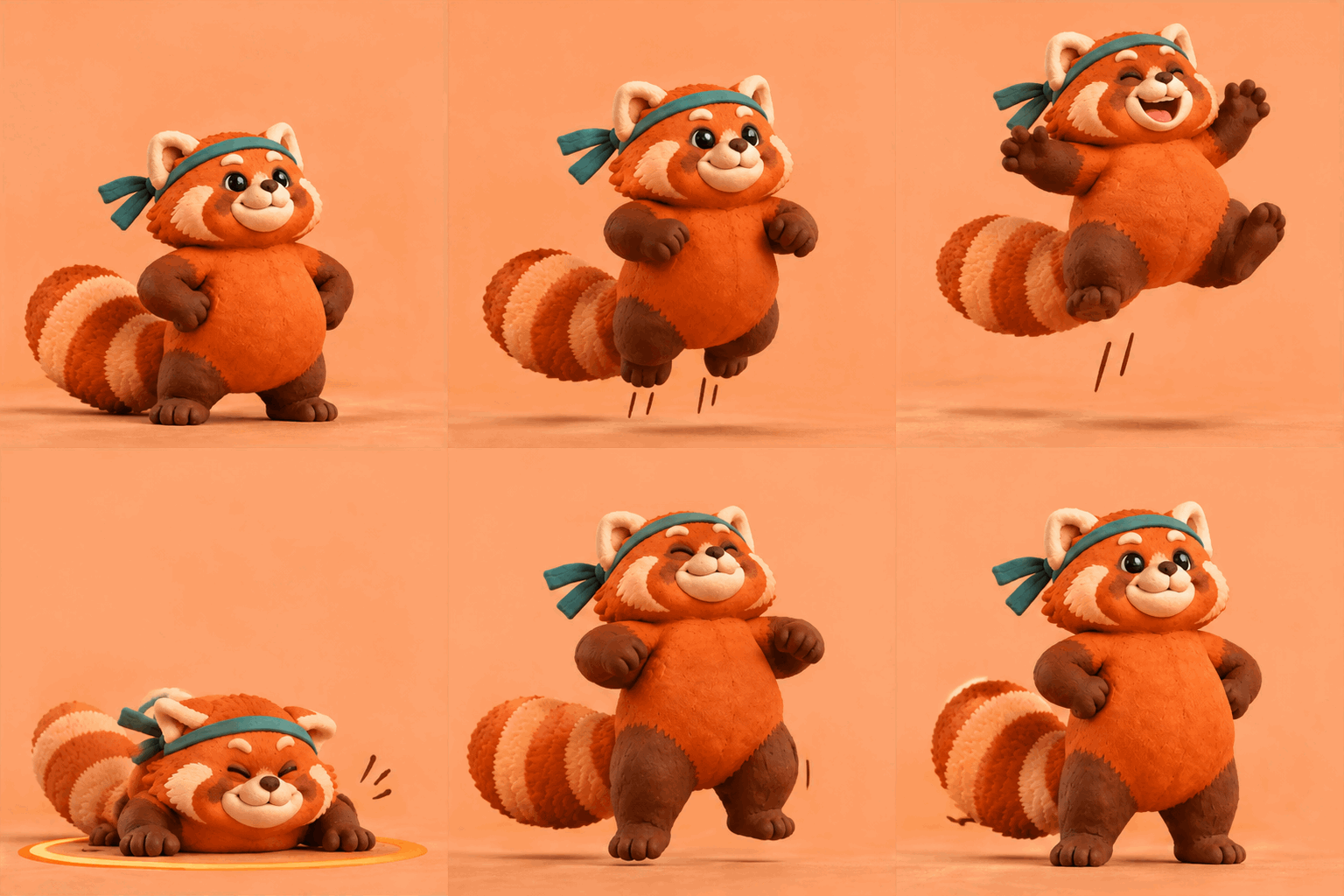
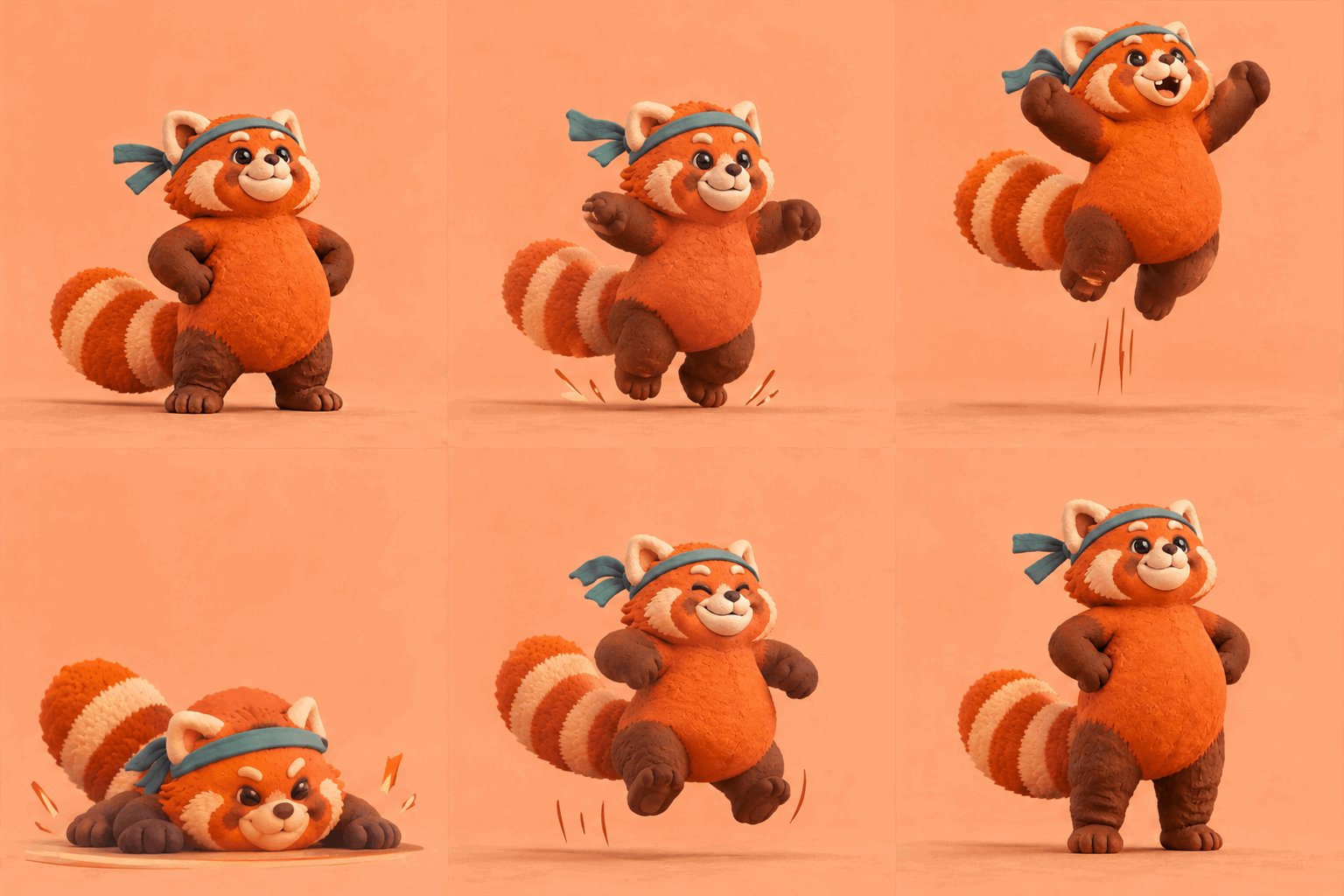
In our tests, medium quality cost about 60% more than low. High cost about 90% more. On the lotus, high did add a little metal-highlight refinement. On everything else, it changed nothing that mattered. The panda pair makes this painfully clear. Medium brought richer clay detail, but the jump's peak still cropped the head. High cropped it too, and added an extra recovery step that broke the return pose:
The soda can fared worse. At medium, the liquid ring got fuller and glossier, and the top of it left the frame. More detail, worse ad. Here's the lotus ladder for comparison. The detail does improve. The problems don't:


Cropping, broken loops, and drifted poses live in the prompt and the reference composition. The quality setting just makes the same mistakes prettier. That's why GifBunny doesn't offer you a quality dial at all. Write a better description instead; it's free.
Complexity: free, and mostly invisible
Officially, complexity carries no separate fee, and our matched runs confirmed it. Identical cost across low, medium, and high. What we saw visually: low missed the lotus's expanding ring entirely and rendered an internal flame instead. Medium and high both executed it. High didn't fix the panda's cropping any more than quality did. Medium is a sound default. Raise it only when you have a specific reason on a specific asset.
One honest caveat before you quote any of this as gospel. Each configuration above ran once, on one day, without a fixed seed. Image generation is random. The comparisons are real and matched, but they describe tendencies, not guarantees. We'd rather tell you that than pretend a single dial change will rescue a bad prompt.
Why we trimmed the dials
Go the raw API route and you inherit a grid: frame_count from 2 to 16, duration from 20 to 2000 ms, six quality levels, three complexity levels, plus size. We just spent this section showing how poorly that grid maps to outcomes. Nine frames billed more than twelve. Quality tiers cost 60 to 90 percent more and repaired nothing structural. Complexity was free and mostly did nothing. And every cell of that grid was a paid generation for us.
Our answer is to not hand you the grid. You get the two choices that reliably change the result, motion detail and playback speed, at the values that survived testing: 8, 12, or 16 frames, 80, 100, or 150 ms per frame. The nine-frame trap isn't offered. There is no quality dial to turn. The default you land on, 12 frames at 100 ms, is the exact setting all six example GIFs in this article were made with.
What this doesn't spare you is composition work. The panda's cropped head survived three quality tiers, and it would survive any default too, because it was a prompt problem. Nobody's tool fixes that for you. What GifBunny rules out is paying to relearn parameter lessons we already paid for.
The failures, and how to fix them
19 of our 50 GIFs failed our own review bar. These were the recurring modes:
Cropping at the action peak. The subject's biggest moment exits the frame. Fix it in composition, before generating. Put the subject smaller in the frame: the lotus reference reserves the central half, and our origami phoenix reserves the central 70% with a 15% empty border on every side. Then write "keep the whole jump in frame" into the prompt. What doesn't work is raising quality or frame count. The panda pair above shows three quality tiers with the same head crop.
Motion too small. The GIF animates a face or a glow while the body stands still. Name the beats in order, and add "the movement must be large and clearly readable, not just a face or texture change."
A static tail at the end. The last frames freeze near the closing pose. Our 16-frame lotus held for five frames. More frames don't fix this. They often become the tail. Tighten the recovery description instead, or drop the frame count.
Rotation drift. The hard one. We wanted a clean sneaker turntable for the product-showcase category, and we're showing you both attempts as failures, on purpose:
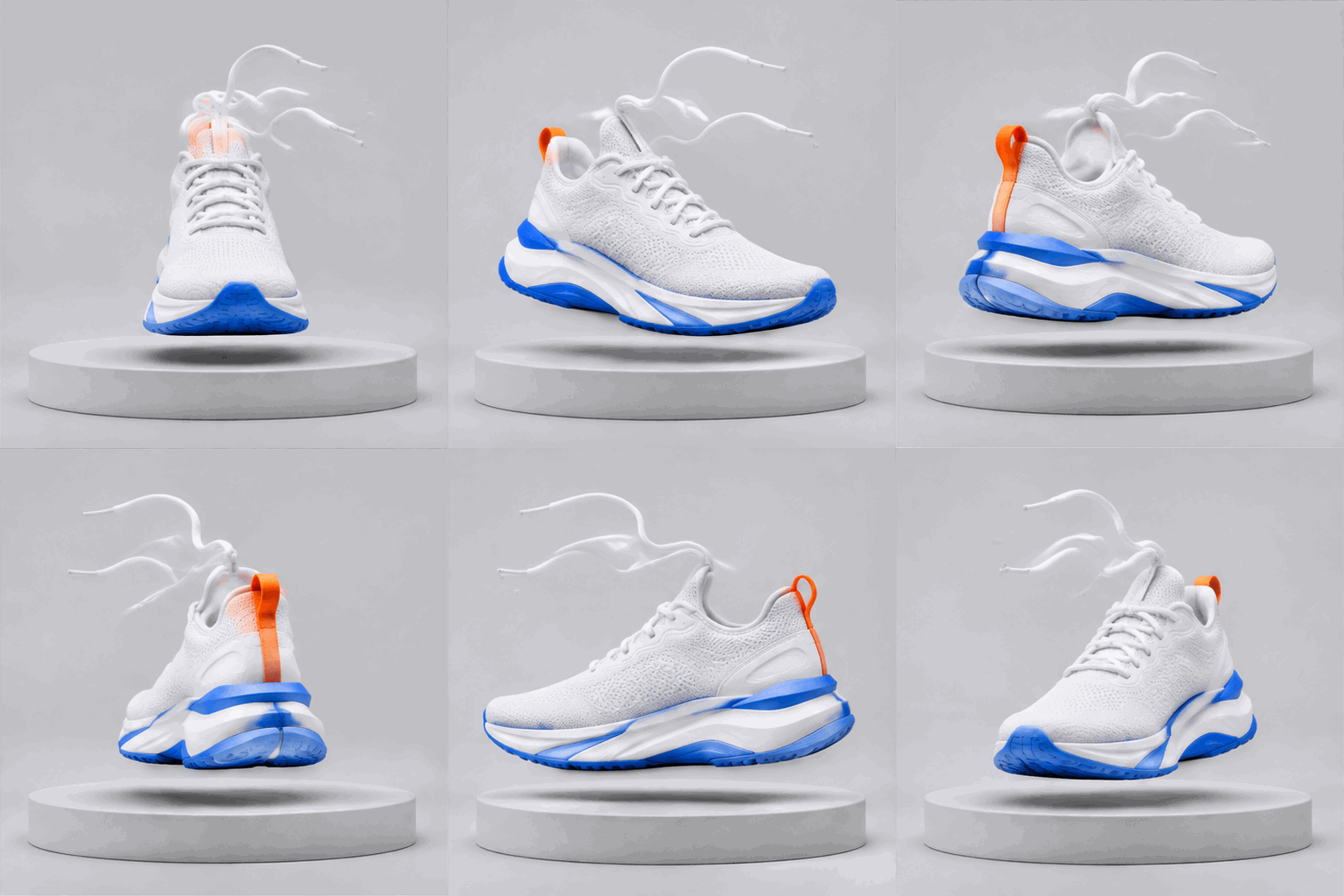
Attempt 1 (12 × 100 ms). Most views readable, but the angle steps go uneven toward the end. Failed.
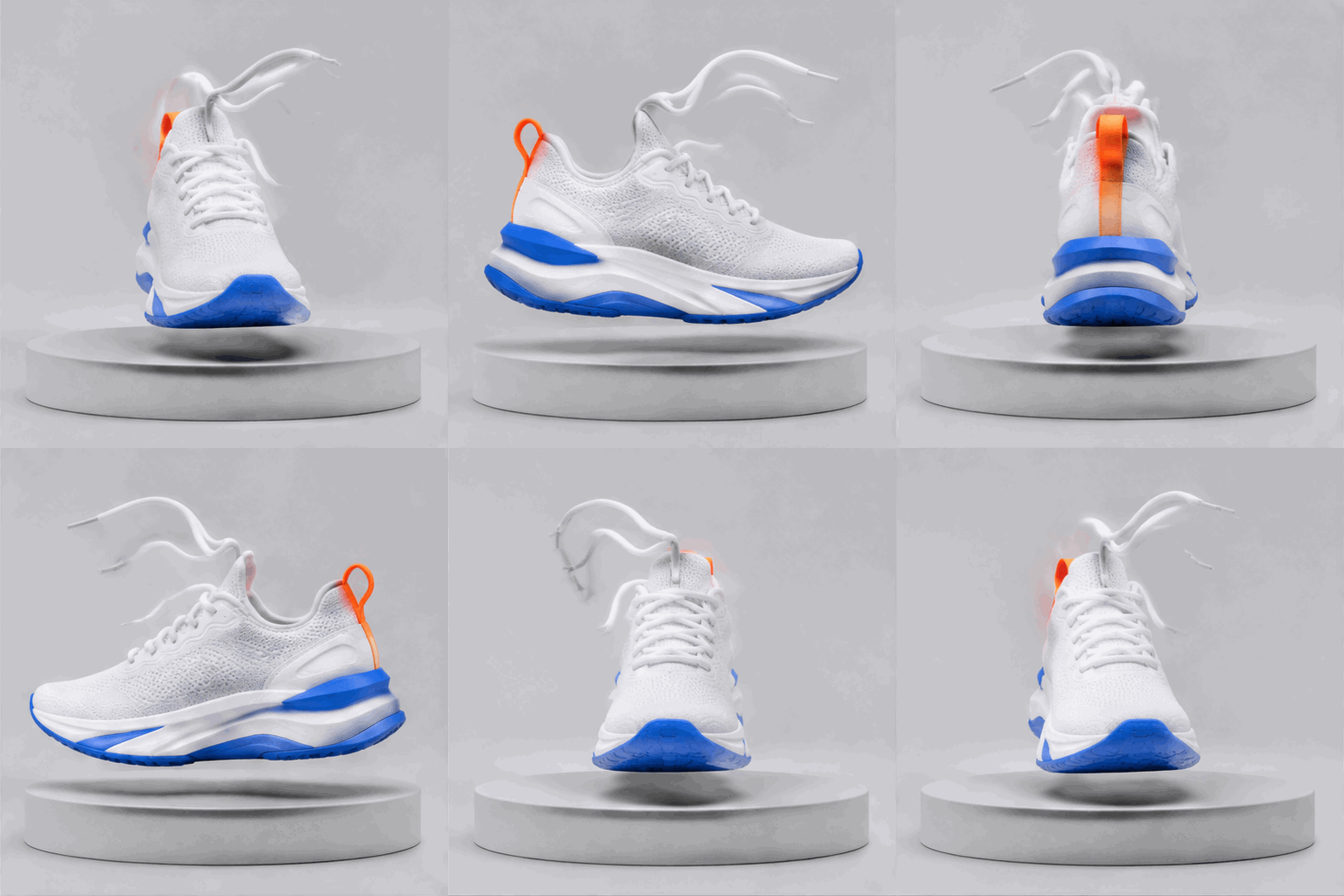
Attempt 2 (16 × 80 ms). The final quarter repeats views and partly reverses. Still failed.
The prompt was precise. One clockwise rotation, equal steps of about 22.5 degrees, "the last view one step before the first". The model read the beats but not the geometry. Meanwhile our neon race car, drifting a full lap around a circular track at 16 frames, passed review. A loose arc forgives what an exact turntable cannot. If you need a precise product turntable, ChatGPT Images 2.6 isn't the tool yet. If you need a spinning, drifting, orbiting feel, it very much is.
Make yours
Every GIF in this article came out of ChatGPT Images 2.6, and the generator at the top of our homepage runs the same model with the tested defaults already loaded. The motion-detail and speed options are right there when you want them. Bring a subject, write the beats, check the loop.